
An Appeal for Implementing the Leap Controller

As a windcontroller player I'm jealous of how much better the samplemodeling Strings sound played on a keyboard that allows handling a lot of the important parameters needed for more realistic string playing.
SWAM has already implemented the use of the TEC Breath Controller, but the Leap Controller offers additional help for controlling additional important parameters for Strings, and has the advantage of easily allowing multiple parameter control with even one hand.
I've posted two links for anyone who has not viewed any such demos.
Leap Controller

Leap Controller & TEC
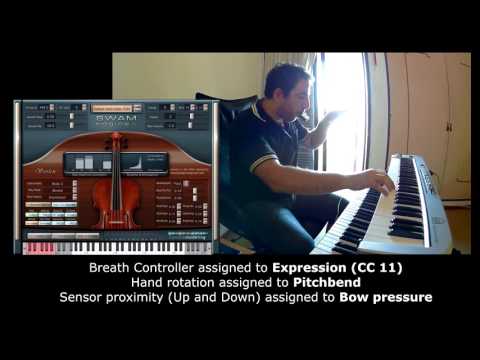
I have heard that plans for High Resolution MIDI may include the use of the Leap Controller, but I and many others I am sure, would love not to have to wait for that.
A number of people have apparently figured out how to use the Leap Controller with SWAM, but no one has fully explained how one would go about that. Perhaps it is not at all that difficult.
HansProd -illustrates how he configured the Leap Controller (Spanish)
http://www.hansprod.com/es/blog/experimentando-con-violin-de-samplemodeling-leap-motion-tec-breath-controller#
So my appeal is:
1) For the SWAM developers. Would you be willing to add Leap Controller to the BC and Windcontroller customizations? I understand that you are terribly busy working on other things, but perhaps this would not be very time consuming.
I'm sure other people would also would be more than happy to pay for a Leap Controller "plug in".
2 If SWAM responds that they cannot, at this time - is there anyone else willing to customize the Leap Controller program ? Or at least be willing to make a written or video tutorial explaining how to accomplish this?
Please add your name to this appeal if you agree with my sentiments.
Thanks,
Dan
SWAM has already implemented the use of the TEC Breath Controller, but the Leap Controller offers additional help for controlling additional important parameters for Strings, and has the advantage of easily allowing multiple parameter control with even one hand.
I've posted two links for anyone who has not viewed any such demos.
Leap Controller
Leap Controller & TEC
I have heard that plans for High Resolution MIDI may include the use of the Leap Controller, but I and many others I am sure, would love not to have to wait for that.
A number of people have apparently figured out how to use the Leap Controller with SWAM, but no one has fully explained how one would go about that. Perhaps it is not at all that difficult.
HansProd -illustrates how he configured the Leap Controller (Spanish)
http://www.hansprod.com/es/blog/experimentando-con-violin-de-samplemodeling-leap-motion-tec-breath-controller#
So my appeal is:
1) For the SWAM developers. Would you be willing to add Leap Controller to the BC and Windcontroller customizations? I understand that you are terribly busy working on other things, but perhaps this would not be very time consuming.
I'm sure other people would also would be more than happy to pay for a Leap Controller "plug in".
2 If SWAM responds that they cannot, at this time - is there anyone else willing to customize the Leap Controller program ? Or at least be willing to make a written or video tutorial explaining how to accomplish this?
Please add your name to this appeal if you agree with my sentiments.
Thanks,
Dan
Comments
->
Using it just to control additional parameters - like Hansprod does - while doing "expression" via Breath will make it very difficult to avoid a woodwind-like impression. I feel that Hansprod is an excellent Breath controller player but nonetheless he can't avoid this problem with low-attack notes.
Regarding additional parameters, I am very happy with the TEC BBC v2 (when using it with woodwinds; I do have the Cello but: see above).
Here I use
- Blowing for Expression
- Bite force for "Style" (feels like blowing angle with the Flute)
- Nodding for Pitch bend
- Head Tilt sidewards for Vibrato Speed
- Keyboard Aftertouch for Vibrato Depth
- Pitchbend Wheel upwards for Flutter Tong
- Pitchbend Wheel downwards for Growl
- Modulation Wheel still available
I doubt that my head would be able to control still more parameters which might be available with a Leap controller
OTOH, Swam "presets" are just a combination of values for the normal parameters. So just having a list of those, it would be easy to input them and save them as a user preset, either with SWAM itself or via the host DAW. (If I had a Leap controller, I am sure that I could do a draft of such list in not too much testing time.)
BTW.: If you want to do keyboard action, another viable option for playing the SWAM strings might be the Seaboard.
->
-Michael
Thanks for the very useful comments. I'm delighted to hear that you are using the newer TEC BC2 (Breath, Bite, & Tilt) to control that many parameters.
I've been considering buying the TEC BC, and wasn't aware until a day two ago that they came out with the BC2 which goes a lot further to controller various useful parameters.
Do you have an audio or video demonstrating how one of the Strings sounds with your BC2 SWAM setup?
As for your link -I've seen the "Bowed Mode" Leap for Viola video which is why I got so excited about the Leap Controller. After I watched it again I found this quote from Sylvain Geneway:
In fact i think it took like few hours just for setup, cause you have to understand and set the leap motion itself (how does it react, where to put it, right or left hand... etc) then you have to set the "Geco Midi" software (you wanna use one or two hands, movements width, offset, understand the software and all it can do... etc) and in this phase, you have to understand the limitations and artefacts of the Leap Motion and how to fix or deal with.... and at the end you have to set the Viola plug in to react the way you want concerning vibrato etc. And only froths [from this] point you can work to play it in a realistic way....
But once it's set and you understood everything, it's pretty simple to modify and to adapt to other instruments.
I've also seen video for the Ikarus -ROLI Seaboard Rise a couple of years ago, when it may not have been selling yet. I just checked and it is now available in the US ($800 Amazon). This version has 2 octaves (25 keys), and the best feature, in my opinion, is that wiggling your finger side to side on a note can be used for vibrato, which seems really a natural way to get vibrato with the same digit that activates the note, so you can control the frequency and amplitude (width or depth?) of the vibrato. I may have to break open my Piggy Bank before I can seriously think about buying one. Of course I would need to get some user feedback from anyone who has used one of these.
Anyone with experience ?
Appreciate your input!
Thanks,
Dan
The Geco MIDI program to configure Leap Motion Controller can be purchased from Leapmotion store. Could not find it from the main web page, only via Google search, which is pretty dumb.
Leap Motion Geco 9.99 (click Apple Icon for Mac)
https://apps.leapmotion.com/apps/geco-midi/windows#
Here is the Documentation on their web page.
http://uwyn.com/geco/docs/
It doesn't look too intimidating so I'm going to get the program and see if I can get it working once I free up some time.
Dan
I am still not very happy yet with me plying the Cello with the BBC. But I can do a little nasty impro as demo for you in the weekend.
-Michael (I'll be back)
Do you already have the leap motion hardware ?
-Michael
An obvious limitation of this setup (this already has been discussed in a forum thread here) is that e.g. stoppinig a performance, you might move your hand out of the range to the right side and starting the next performance you want to "get in" (placing the bow) from the left side. Obviously the Leap controller will "jump" the CC value from max to min which supposedly will create a nasty effect with the SWAM software, if you (and you will want to do so!) pressed a key before starting the bowing . I don't know if this can be handled from "outside" or if Sample Modeling would need to implement some precaution to avoid this.
Using Reaper I might be able do a script that delays the note-on event in such a situation, but I am not sure about the implications.
-Michael